
VOVSOFT Window Resizer 4.3
Utility that allows you to quickly adjust the size and position of any open window in Windows.
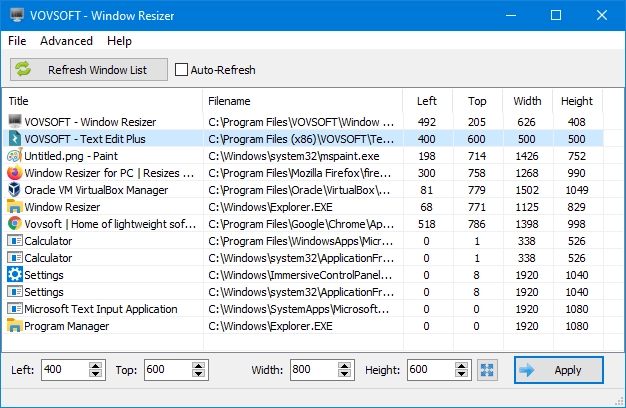
Window Resizer allows you to quickly adjust the size and position of any open window in Windows. You can set exact values for width, height, and screen coordinates, ensuring that each window is precisely where you want it. This is especially convenient when it is necessary to keep windows organized in a standardized way on one or multiple monitors.
The program offers the option to select a window from the displayed list or capture it directly with the cursor. It is also possible to save settings to files to restore layouts later, which helps when work depends on multiple windows in fixed positions.
There is also a mode that forces resizing even in applications that normally do not allow resizing freely. This way, Window Resizer works well for both resolution testing and for organizing the workspace.
It is a small, lightweight, and straightforward application, with no complex requirements, allowing you to adjust windows quickly and accurately whenever needed.
File security
0/72 engines flagged the file in the recorded scan.
Scan date: 10/26/2025
SHA-256: d13d1fed016f206256fef7656869f3d65526e7ca1255a4cdf1ce447c7ddc3294
Found a problem on this page?Tell the team about broken links, versions or incorrect information.
Related

QontrolPanel 2.3.0
Custom audio panel for Windows that replaces or complements the system's standard sound controls.

SoundSwitch 7.3.3
Software that enables quick switching of audio devices in Windows.

Fastfetch 2.68.1
Command-line tool that provides system information.
Sandboxie 5.73.3
Install software and browse the web securely in an isolated
RisohEditor 6.1.9
Resource editor for Windows that allows you to create and modify resource files.

NTLite 2026.09.11904
Software that allows customization of Windows installations.

Grub2Win 3.0.3.9 Build 2013
Tool that facilitates the installation of multiple operating systems.
Win11Debloat 2026.08.24
Simplified bloatware removal script for Windows 11.