
Monitorian 4.15.2
Utility for Windows that allows you to adjust the brightness of multiple monitors.
Monitorian is a lightweight and free application for Windows that makes it easy to adjust the brightness of monitors, especially in multi-monitor setups.
- Brightness Control: Allows you to adjust the brightness of each monitor connected to the system independently or simultaneously. This is useful for users with external monitors, as Windows natively does not provide granular control for multiple screens.
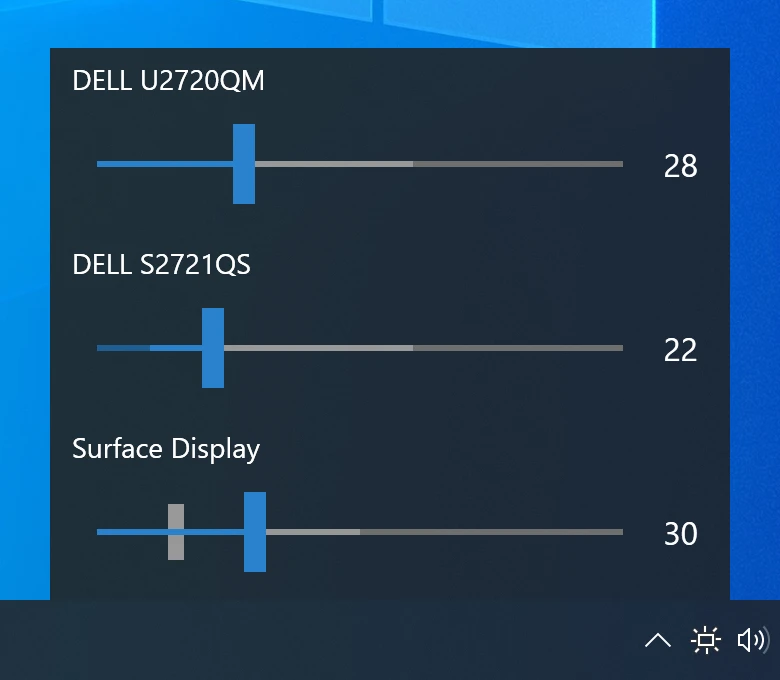
- User Interface: The application primarily operates from the system tray. Clicking on the icon brings up a minimalist interface with sliders for each detected monitor, allowing for quick adjustments. The interface is intuitive and avoids complexity.
- Monitor Support: Works with monitors that support the DDC/CI (Display Data Channel/Command Interface) protocol, which is common in modern monitors. However, compatibility depends on the hardware; some older or specific monitors may not be fully supported.
- Auto Adjust (Optional): On systems with compatible ambient light sensors, Monitorian can automatically adjust the brightness based on the lighting conditions of the environment. This functionality, however, depends on hardware support.
- Additional Features:
- Keyboard Shortcuts: Allows you to set up custom shortcuts to quickly increase or decrease brightness.
- Brightness Profiles: Some versions allow saving brightness settings for different usage scenarios.
- Dark Mode: The interface supports dark mode, adapting to the operating system's theme.
- Renaming Monitors: You can rename monitors in the interface to make identification easier in setups with multiple screens.
- System Requirements: Works on recent versions of Windows (such as Windows 10 and 11). Requires monitors to support DDC/CI and updated video drivers to ensure compatibility.
- Limitations:
- The functionality depends on the monitor's compatibility with DDC/CI. Monitors without support may not be recognized.
- Does not support contrast adjustments or other image settings, focusing exclusively on brightness.
- In some cases, there may be slight delays in the response of adjustments, depending on the communication between the software and hardware.
Old versions
File security
0/65 engines flagged the file in the recorded scan.
Scan date: 07/04/2026
SHA-256: 1fab2d7ae397bdbcbe85cec5aac27c03ee52b1048facdbe630af33db1781e7b2
Found a problem on this page?Tell the team about broken links, versions or incorrect information.
Related

QontrolPanel 2.2.3
Custom audio panel for Windows that replaces or complements the system's standard sound controls.

SoundSwitch 7.3.3
Software that enables quick switching of audio devices in Windows.

Fastfetch 2.68.1
Command-line tool that provides system information.
Sandboxie 5.73.3
Install software and browse the web securely in an isolated
RisohEditor 6.1.9
Resource editor for Windows that allows you to create and modify resource files.

NTLite 2026.09.11904
Software that allows customization of Windows installations.

Grub2Win 3.0.3.9 Build 2013
Tool that facilitates the installation of multiple operating systems.
Win11Debloat 2026.08.24
Simplified bloatware removal script for Windows 11.