
What is MinimizeToTrayTool
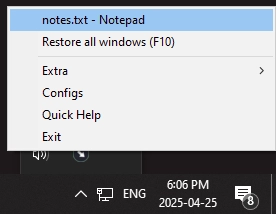
MinimizeToTrayTool is a tool for Windows that allows you to minimize program windows directly to the system tray instead of just keeping them on the taskbar. This helps to keep the taskbar cleaner while the program continues running discreetly.
Main features
You can define which applications will be minimized to the tray based on the executable name. Just provide the file name (.exe) so that MinimizeToTrayTool automatically minimizes that application whenever it is reduced.
It allows you to exclude certain windows based on the title text, using wildcards or regular expressions—useful for filtering specific applications or unwanted windows.
Supports minimizing all selected windows at once to the tray, as well as restoring all of them simultaneously.
To restore a minimized window, simply click the corresponding icon in the system tray. There is also an option to maximize all minimized windows at the same time.
You can configure it via drag and drop: you drag a target "image" onto the window of another application to add it to the automatic minimization list.
Requirements and limitations
To minimize programs that run with elevated privileges (administrator), MinimizeToTrayTool also needs to be run with administrator privileges.
Compatible with various versions of Windows: it works on Windows XP, Vista, 7, 8, 8.1, and 10, both in 32-bit and 64-bit.
The interface is quite lightweight and the program can run in the background without consuming many resources, as its main function is to intercept the minimize action and redirect it to the tray.
As shareware, there is a trial period and then a license must be purchased.
Advantages of using
Organization: reduces clutter on the taskbar, especially when you are using multiple programs at the same time.
Accessibility: keeps important applications accessible from the tray, without being permanently visible on the taskbar.
Automation: once configured, you don't need to manually minimize each window—the software applies the rules automatically.
Flexibility in configuration: allows advanced rules to choose exactly which windows to minimize, based on titles or executable names.
Points of attention
If used incorrectly, it can "hide" important windows (or all), so it is advisable to configure it carefully and test it with the applications you really want to minimize to the tray.
Since minimized to the tray does not appear in Alt+Tab, there may be a risk of "losing" the minimized window if you don’t know where to restore it (from the tray).
Programs that close when minimized to the tray may interfere with the minimization logic if they are set to "close when minimized"; it is ideal to validate the behavior for each app.
Old versions
Found a problem on this page?Tell the team about broken links, versions or incorrect information.
Related

QontrolPanel 2.2.3
Custom audio panel for Windows that replaces or complements the system's standard sound controls.

SoundSwitch 7.3.3
Software that enables quick switching of audio devices in Windows.

Fastfetch 2.68.1
Command-line tool that provides system information.
Sandboxie 5.73.3
Install software and browse the web securely in an isolated
RisohEditor 6.1.9
Resource editor for Windows that allows you to create and modify resource files.

NTLite 2026.09.11904
Software that allows customization of Windows installations.

Grub2Win 3.0.3.9 Build 2013
Tool that facilitates the installation of multiple operating systems.
Win11Debloat 2026.08.24
Simplified bloatware removal script for Windows 11.