
Desktop Info 3.22.0
Application that displays relevant information on the system desktop.
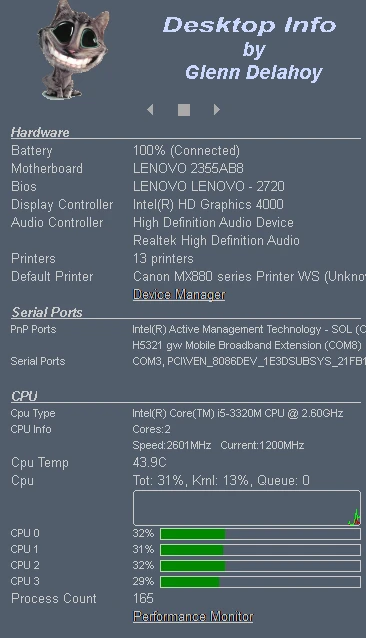
Desktop Info is a lightweight and functional software that displays detailed information about the operating system and hardware directly on the Windows desktop. It offers a practical solution for those looking to monitor computer performance without the need to open multiple windows or additional programs.
Through a simple configuration menu, you can customize various aspects, such as the position of the text on the screen, font size, background and text color, as well as choose which data will be displayed. Among the available options are information such as CPU usage, available RAM, disk space, IP address, component temperature (when supported by the hardware), and even the version of the operating system. This flexibility allows you to tailor the program to your specific needs.
Especially recommended for technicians, technology enthusiasts, or anyone who needs to keep certain system metrics in view, Desktop Info stands out for its practicality. It does not require installation, meaning that you just need to download the executable file and start it to begin using it immediately. Additionally, being portable, it can be carried on a USB drive and run on different machines without leaving traces on the system.
Another positive point is its low resource consumption, ensuring that the program runs smoothly even on older computers or with modest configurations. Whether for real-time monitoring or just to have important data always accessible.
Old versions
File security
0/66 engines flagged the file in the recorded scan.
Scan date: 05/09/2026
SHA-256: 25aac1515915fc8732c14d783318e22af4560ed4cec93cc2a12d5945f368f6f3
Found a problem on this page?Tell the team about broken links, versions or incorrect information.
Related

QontrolPanel 2.2.3
Custom audio panel for Windows that replaces or complements the system's standard sound controls.

SoundSwitch 7.3.3
Software that enables quick switching of audio devices in Windows.

Fastfetch 2.68.1
Command-line tool that provides system information.
Sandboxie 5.73.3
Install software and browse the web securely in an isolated
RisohEditor 6.1.9
Resource editor for Windows that allows you to create and modify resource files.

NTLite 2026.09.11904
Software that allows customization of Windows installations.

Grub2Win 3.0.3.9 Build 2013
Tool that facilitates the installation of multiple operating systems.
Win11Debloat 2026.08.24
Simplified bloatware removal script for Windows 11.