
Bloatware Removal Utility (BRU) 05-28-25
Utility that allows you to remove pre-installed applications (bloatware) from Windows 7, 8, 10 and 11.
The most recent versions of Windows come with a large number of pre-installed applications, some of them indispensable, but others that are not needed at all, and worse, they take up space and slow down your system.
Bloatware Removal Utility is a script written in Batch capable of removing pre-installed applications, the so-called bloatwares. The software works on Windows 7 and higher versions.
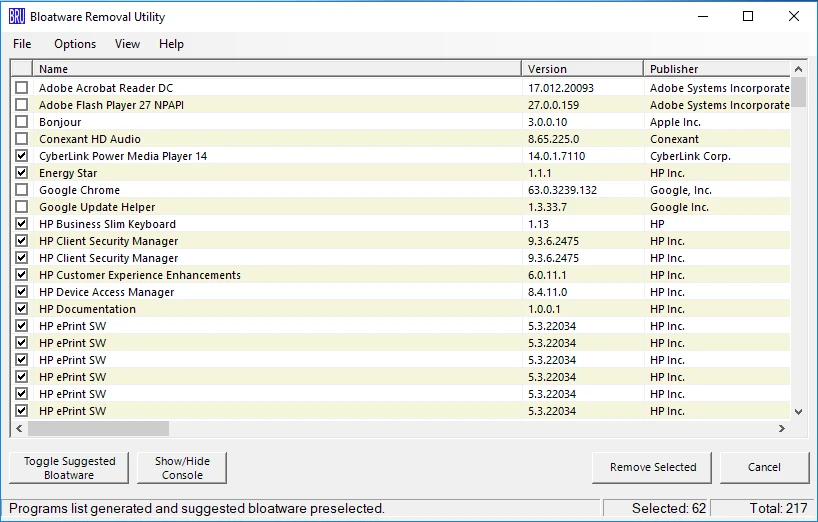
To use it, simply open the downloaded compressed file and run (as administrator) the Bloatware-Removal-Utility.bat file. The command prompt will open briefly and then the GUI will appear.
The interface is very easy to use, just browse through the displayed list of programs and select the ones you want to uninstall. If you prefer, BRU has a button that selects a list of recommended bloatware to be removed.
Old versions
File security
0/65 engines flagged the file in the recorded scan.
Scan date: 05/29/2025
SHA-256: a175570436344a3b63c722dc536f686b782a933a9a3089773b3c6423d0f8ca32
Found a problem on this page?Tell the team about broken links, versions or incorrect information.
Related

QontrolPanel 2.2.3
Custom audio panel for Windows that replaces or complements the system's standard sound controls.

SoundSwitch 7.3.3
Software that enables quick switching of audio devices in Windows.

Fastfetch 2.68.1
Command-line tool that provides system information.
Sandboxie 5.73.3
Install software and browse the web securely in an isolated
RisohEditor 6.1.9
Resource editor for Windows that allows you to create and modify resource files.

NTLite 2026.09.11904
Software that allows customization of Windows installations.

Grub2Win 3.0.3.9 Build 2013
Tool that facilitates the installation of multiple operating systems.
Win11Debloat 2026.08.24
Simplified bloatware removal script for Windows 11.