
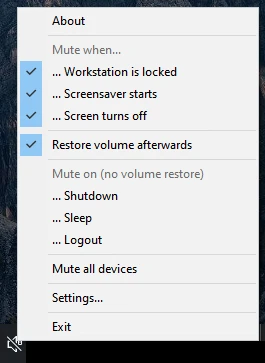
WinMute is a small utility for Windows designed to automatically mute the computer's sound in specific situations, ensuring discretion and avoiding unwanted interruptions. It operates fully automatically, adjusting the volume as certain system conditions are met.
Among the configurable criteria, it is possible to set automatic mute when the computer is locked, the screensaver is activated, the monitor is turned off, the user logs off, the system enters hibernation, or is shut down. It is also possible to configure it to mute the sound when the PC connects to a specific Wi-Fi network, which is useful in corporate, public, or quiet environments.
The application is designed to run in the background without requiring constant interaction. As soon as the defined conditions are detected, the sound is immediately disabled and automatically restored when the event ends, providing predictable and practical behavior.
WinMute is a lightweight, portable application that requires no installation. Just extract and run the file to start using it, making it convenient for portable use on flash drives or systems where modifications to the environment are not desired.
The program consumes minimal system resources and maintains stable operation even in long usage sessions. Its focus is on simple and efficient functionality, without complex menus or excessive settings, prioritizing automation and convenience.
By automating sound control according to the context, WinMute helps avoid embarrassing situations, such as sound alerts during meetings, classrooms, or presentations. It is a practical solution for those looking to maintain system silence without relying on manual adjustments.
Old versions
File security
3/70 engines flagged the file in the recorded scan.
Scan date: 11/12/2025
SHA-256: ba2bfc41673078672280a215ad5487d845a20737198da612d2a828297e4b188c
Found a problem on this page?Tell the team about broken links, versions or incorrect information.
Related

QontrolPanel 2.3.0
Custom audio panel for Windows that replaces or complements the system's standard sound controls.

SoundSwitch 7.3.3
Software that enables quick switching of audio devices in Windows.

Fastfetch 2.68.1
Command-line tool that provides system information.
Sandboxie 5.73.3
Install software and browse the web securely in an isolated
RisohEditor 6.1.9
Resource editor for Windows that allows you to create and modify resource files.

NTLite 2026.09.11904
Software that allows customization of Windows installations.

Grub2Win 3.0.3.9 Build 2013
Tool that facilitates the installation of multiple operating systems.
Win11Debloat 2026.08.24
Simplified bloatware removal script for Windows 11.