
NWinfo 1.6.6
Lightweight and portable tool for Windows, designed to provide detailed information about a computer's hardware and system.
Baixe.net VerifiedOfficial source checked on 08/13/2026 by Team Baixe.net.Learn about verification →NWinfo is a lightweight and portable tool for Windows, developed to provide detailed information about a computer's hardware and system. Created as an open-source utility by a1ive, NWinfo is available in two versions: one with a graphical user interface (GUI) and another based on command line (CLI), both compatible with 32-bit and 64-bit systems. This duality makes the tool versatile, catering to both regular users and IT professionals who need advanced functionalities.
GUI Version
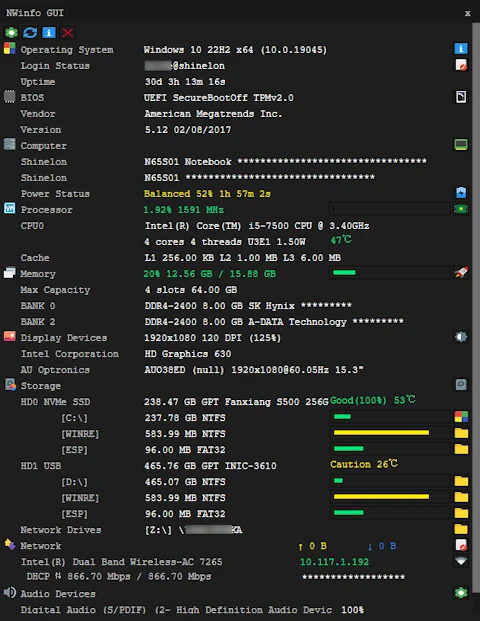
When running the program (gnwinfo.exe for 32-bit or gnwinfo64.exe for 64-bit), a simple and intuitive interface displays essential information, such as:
Operating System: version, build, and uptime.
User Login: status of the current user.
BIOS: manufacturer and version.
Hardware: details about the processor, RAM, GPU, and monitors.
Storage: information about HDDs, SSDs, NVMe drives, and M.2 devices.
CLI Version
The command line version offers more advanced functionalities, allowing:
Specifying parameters for specific components.
Exporting data in formats like JSON, YAML, or LUA.
Hiding sensitive information, such as MAC addresses or serial numbers.
Generating detailed reports or monitoring CPU, RAM, and storage usage in real-time.
Main Features
Portability: Does not require installation, can be run directly from a USB drive on any Windows machine.
Direct Data Collection: Obtains information directly from the hardware, without relying on WMI (Windows Management Instrumentation), ensuring greater speed and accuracy.
Compatibility: Works even on older systems, like Windows XP.
Advanced Detailing: Provides data on SMBIOS, CPUID, S.M.A.R.T., PCI, EDID, and much more, covering everything from processor specifications to the health of storage devices.
With its combination of simplicity and power, NWinfo is an efficient solution for those seeking a complete and precise view of a computer's system and hardware.
Old versions
File security
SHA-256: 67dd453400e675b3fd55bb43a01a136da15648fbf2f24100b1a90f1dde22e3e0
Found a problem on this page?Tell the team about broken links, versions or incorrect information.
Related

NTLite 2026.09.12209
Software that allows customization of Windows installations.
Monitorian 4.16.1
Utility for Windows that allows you to adjust the brightness of multiple monitors.

Fastfetch 2.69.0
Command-line tool that provides system information.
VirtualBox 7.2.20
Software that allows you to virtualize one operating system within another.

Grub2Win 3.0.4.0 Build 2015
Tool that facilitates the installation of multiple operating systems.

RisohEditor 6.2.1
Resource editor for Windows that allows you to create and modify resource files.

QontrolPanel 2.5.0
Custom audio panel for Windows that replaces or complements the system's standard sound controls.
CareUEyes 2.6.3.0
Software that protects user's eye health by adjusting system brightness.